✦ DriveByView for resorts

The first impression, logged on every pass.

Guests judge your resort from the moment they turn onto the approach road — the gate, the beds, the signage, the frontage turf. Partner vehicles already drive that road and your grounds every day. DriveByView turns those passes into scheduled condition reports — arrival presentation, golf course edges, landscape health, lighting — without sending a single extra cart. Every site builds a chronological record — dated before/after frames your grounds crew plans around, and your GM or ownership group can see results in.

This is about the condition of your grounds — never about identifying guests or staff. AI automatically blurs faces and plates on every frame, and reports are visible only to your property. How we protect everyone →

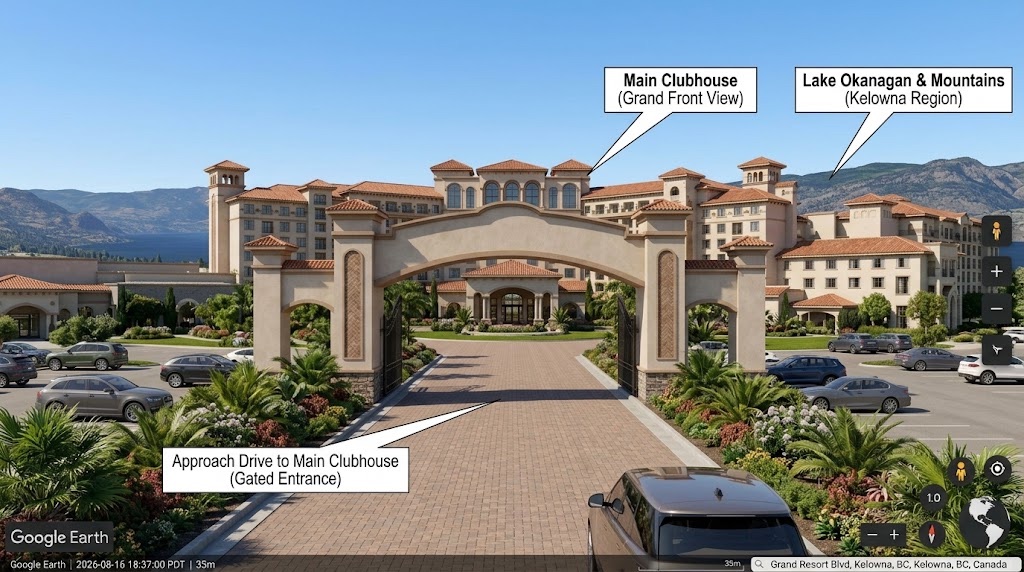
Lake & Mountains
(illustrative region)
Arrival view — the grand entrance · Fri, 4:30 PM
What you get

Guest-ready grounds, on a schedule you set.

Arrival & entrance presentation

The gate, porte-cochère, signage, beds, and lighting your guests judge you by — the first impression, logged on every pass so it's never off on the day that matters.

Frontage & approach drive

The road guests arrive on — curb appeal, frontage turf and beds, medians and entry islands — reviewed from the drive itself, no site visit.

Golf course edges & turf

Fairway edges, cart-path condition, tee signage and hole markers that sit within view of the roads and paths — drift caught while it's a fix, not a re-turf.

Landscape & irrigation

Irrigation failures and dead zones across the grounds caught early — while they're a repair, not a replanting before a peak weekend.

Signage, lighting & wayfinding

Burnt-out entry lighting, faded or knocked signage, wayfinding that's gone dark — flagged against each property's baseline before a guest points it out.

Guest-facing cleanliness

Litter, overflowing bins, and post-event or post-storm debris on the routes guests actually see — documented pass by pass, before-and-after.

Seasonal & event readiness

Before a tournament, wedding, or long weekend — a dated record that the grounds are presentation-ready, and proof afterward of how they were left.

Perimeter & back-of-house

Fence lines, the treed perimeter after a windstorm, service yards and villa rows — the parts of a large property nobody walks weekly, reviewed from the road.

Graffiti & vandalism

New tags or damage on frontage walls, signage, and structures flagged fast against baseline — rapid removal is what keeps it from recurring.
From the approach road to the map

One approach road can watch a whole property.

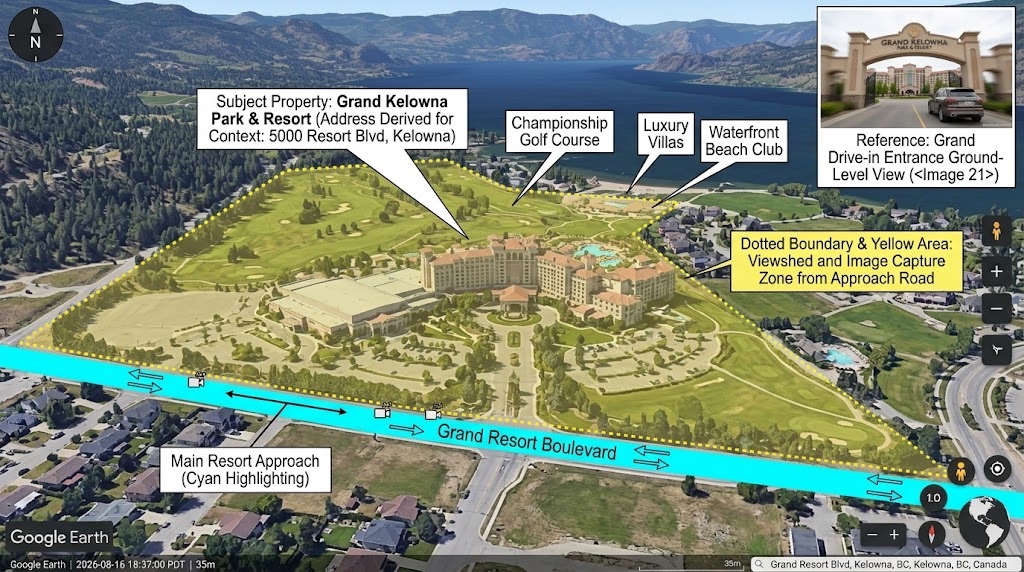
A resort's frontage, entrance, golf course edges, and villa rows all sit inside the viewshed of the roads guests already arrive on. Every pass along the approach becomes a dated condition record of everything it can see — no drones, no site visits, no extra carts.

Subject Property: Example Resort & Grounds (illustrative — any resort, golf course, or campground)
Resort Approach Road
Reference: Resort Entrance Ground-Level View
Overhead: the capture zone at a resort — viewshed from the approach road (illustrative example)
AI baseline comparison

It knows what "guest-ready" looks like at your property.

Every pass is compared against a learned per-property baseline — when something drifts, your team hears about it in plain language, with annotated frames to prove it. Looking back is easy too: compare passes across weeks and seasons, side by side, to see whether the entrance is improving or sliding.

Guest-ready condition
1 change detected — flagged before check-in

Train it on the conditions you care about

Beyond automatic change detection, your team can teach the AI the specific things your property is judged on — it checks for them on every pass and flags them the moment one appears.

🌱 Dead turf zone 💡 Entry light out 🪧 Damaged signage + Your own condition
How it works

No new carts. No installed cameras. Just the drives that already happen.

  1. Partners already drive your approach

    Delivery services, shuttle and rideshare traffic, vendor vehicles, and registered community drivers already pass your entrance, frontage, and grounds — usually several times a day, at different hours.

  2. Your property's zones switch on

    Your subscription brings your property into the product. Each pass is sliced and annotated for your zones — guest-facing views of your entrance, frontage, and grounds, and nothing past their edges.

  3. Your team gets condition reports

    Plain-language reports with annotated frames, on the cadence you choose. Raw video exists only behind an explicit request from your verified account.

Get started

Request a pilot for your property.

Tell us the approach road, entrance, frontage, or course edges you'd like regular check-ins on. We'll map them against partner routes already driving your area and propose a pilot.

Resort, golf course, campground, or hospitality group.

Prefer email? Write us at support@drivebyview.com

Common questions

Fair questions, straight answers.

Is this watching guests or staff?
No. DriveByView reports on the condition of your grounds — turf, beds, signage, lighting, cleanliness — never on people. AI blurs faces and license plates on every frame before anyone sees it, and any busyness signal is reported only as aggregate activity levels, never as individuals.
Who sees the reports?
Only your verified account. A property subscribes for its own grounds, verified like any business location. Nothing is public, browsable, or mapped — this is the opposite of street-view products. Reports for your property belong to your organization and no one else.
Does it replace grounds walks and inspections?
It prioritizes them. Instead of walking the whole property to find what needs attention, your crew starts the day knowing — send them where the report says, and skip what's already guest-ready. Regular street-side check-ins mean hands-on time goes where it matters most before check-in.
What about the interior of the course or grounds the road can't see?
DriveByView covers what sits inside the viewshed of the roads and drives partners already travel — your approach, frontage, entrance, and the course/grounds edges within view. It's the guest-facing envelope of the property, not a substitute for on-course agronomy. Tell us your priority zones and we'll show you exactly what the passes can and can't see.
What does it cost?
Pilots are priced per engagement based on the property and the pass cadence partner routes can support. All pricing is illustrative until launch — request a pilot and we'll propose numbers for your specific property.

Your guests already drive up. Put those passes to work.

Tell us your property and we'll show you what a season of regular arrival-and-grounds reports looks like — without a single extra cart on the road.

Request a pilot